
How Cofide works
This page provides an overview of the key components in the Cofide Connect platform. For a more in-depth summary of the concepts associated with workload identity and the Connect platform, you can read the Concepts page.
Components
Section titled “Components”The Cofide Connect platform comprises the following major components:
Cofide Connect
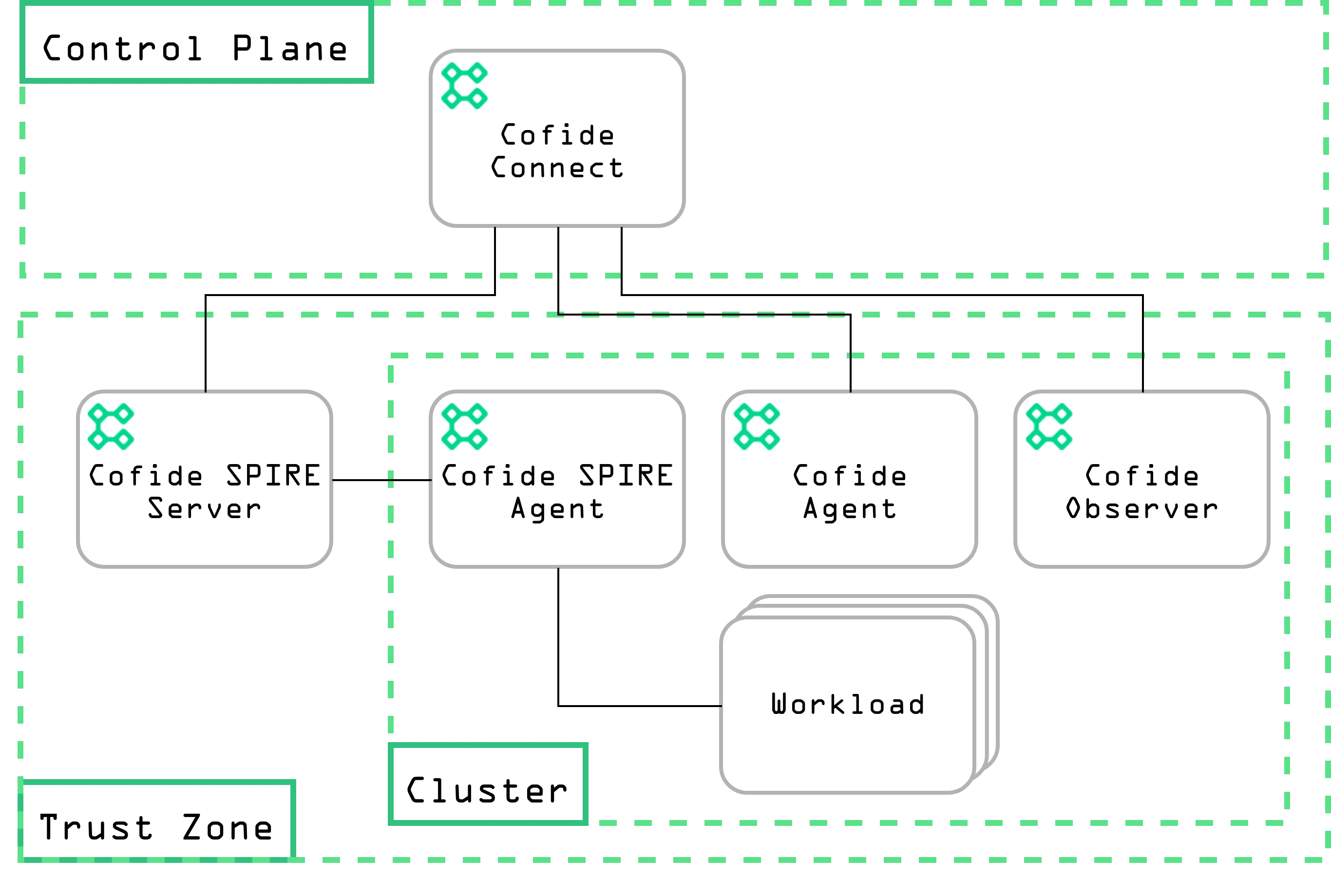
Section titled “Cofide Connect”The central service which backs the platform is Connect. This acts as a control plane to manage resources and configurations, making the process of establishing and using zero trust methods such as mutual TLS (mTLS) between remote workloads robust and scalable. It performs a number of key tasks in enabling this:
- Provides APIs to create and configure Cofide resources, including trust zones, federations and attestation policy (see Concepts for more details);
- Management and serving of trust bundles for environments onboarded to the platform;
- Provides service management and discovery capabilities for least-privilege networking across trust boundaries.
There are numerous ways to interact with Connect: via the Dashboard, cofidectl (the CLI), a Terraform provider, and directly via the gRPC API.
Cofide SPIRE Server
Section titled “Cofide SPIRE Server”The Cofide SPIRE server is a Connect-optimised version of the SPIRE server. It has been enhanced to support enterprise deployment being backed by a Connect control plane instance. This removes the need to provision and administer per-server database structure. Managing each server with Connect allows for seamless configuration and scalability.
Cofide Observer
Section titled “Cofide Observer”The Cofide Observer is a workload-level telemetry agent, which is responsible for collecting relevant information regarding workloads running in the Kubernetes cluster in which it is deployed. It is used in conjunction with the Cofide SPIRE Server to augment its capabilities, enabling advanced attestation policy cases (such as pod label selector policy).
Cofide Agent
Section titled “Cofide Agent”The Cofide Agent is a lightweight process which connects securely to the Connect control plane, handling tasks like bundle updates, inbound/outbound federation, and programming the downstream network path (via xDS, or for meshes such as Istio) for seamless cross-boundary mTLS.
The Cofide Agent is installed by onboarding an environment using cofidectl with the Connect plugin, or more directly with the Agent Helm chart.
High-level architecture
Section titled “High-level architecture”An architectural overview of Connect for a single trust zone deployment is provided below:
© 2026 Cofide Limited. All rights reserved.